
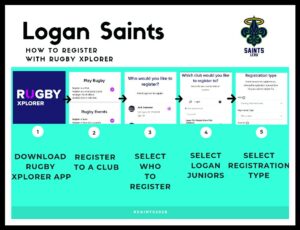
Registration is done via the Rugby Xplorer App. It can take up to 15 minutes to register so please allow yourself time to do it.
*For those registering juniors ( U5 – U16 ) you will need their height and weight.
*If you have a Play On voucher please message us on our FB page, or email secretary@loganrugby.com.au, and we will provide you with a code to use for registering.
Steps:
1. Download the Rugby Xplorer App on your phone.

2. Open the app and click on the ‘3 dots’ More at the bottom
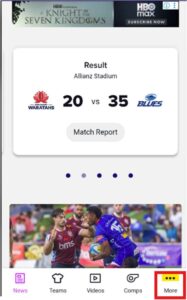
3. Click on ‘Register’
4. Click on ‘Create a Rugby Xplorer Account’
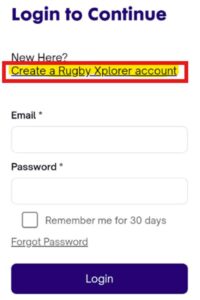
5. Fill out the form with your details (not your child’s details if you are registering a junior)
Rugby National: Rugby Australia
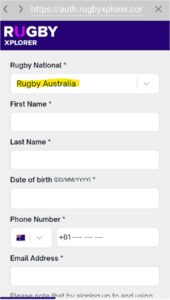
6. Once you have filled out the details click on NEXT
7. Rugby Xplorer will send you an email. Go to the email and click on Verify Email

8. Set a password then click on Confirm.
Your password needs to have a minimum of 10 characters with at least 1 uppercase
letter, 1 lowercase letter and 1 number and 1 special character
9. Login to the app to Continue – Type your email address and password and click on Login
10. Click on the ‘3 dots’ More at the bottom again
11. Click on ‘Register’
12. Click on ‘Play Rugby’
13. Who would you like to register? – Select yourself or ‘Link a new person’
Note: Steps 14 – 16 are if you are registering another person other than yourself ie your child.
14. Fill out the form with your child’s details
15. Click on Sign Up
16. Who would you like to register? – Select your child you would like to register
17. Click on Next
18. Which club would you like to register to? – Type in ‘Logan City’ and scroll down and
select ‘Logan City Rugby Union Club (Juniors)’ or ‘Logan City Rugby Union Club (Seniors)’
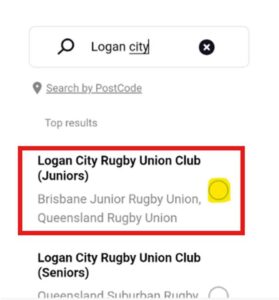
19. Click Next
20. Fill out the form
Note: For U5 – U7 Registration Type is ‘Get Into Rugby – Tri Time’
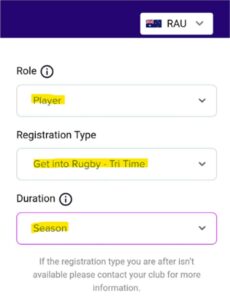
21. Click on Next
22. Personal details: Check all the details are correct and click on Next.
(If they are not correct click on Back and update the details)
23. Profile photo: Upload a photo or click on Skip
24. Additional details: Fill out the form then click on Next
25. Parent/Guardian contact details: Fill out the form then click on Next
26. Additional questions: Fill out the form then click on Next
27. Registration Summary: Check all the details are correct then click on Pay
28. Enter your payment details and click on Pay Now
